If you use Python in your work, or simply for scripting,
chances are that there will come a point in time when you are
going to need to work with dates.
It can be doing a conversion from one format to the other one,
changing the timezone, etc.
Since you have already decided to read this article, then why
don’t we stop wasting time talking and just start immediately
learning?
1. Convert a string into a date
Despite being engineers, we still spend a considerable amount
of time using a natural language to talk.
Since that is the case, we can also convert a string looking
like a natural phrase into a date as shown below:
In this example:
%d — represents the day of the month, like 21, 22, 23, etc.
%B — represents the actual name of the month like January,
February, March etc.
%Y — represents the year, like 2020, 2021, etc.
2. Convert from one timezone to another one
As we are mostly working remotely these days, we may have the
chance to also work with someone who is in another timezone.
You can of course just Google and find out what time it is now
in New York City even if you have never been before, but there
is joy in implementing this yourself.
Let’s see how to do that.
3. Find the number of days between 2 dates
Since we still live in this universe where time passes, we may
need to find the number of days that have passed between one
point and another one.
We can of course pull up a calendar and manually count the
days, which is slow and boring.
To do that quickly, we can import the date module in
our Python script and initially prepare the dates:
After that, we can basically just find the difference between
2 numbers:
Yes, it’s that simple.
You do not have to spend hours doing it manually on a physical
calendar. It can take barely a few moments to do it like this.
4. Add days to a date
Let us imagine that you are working on a feature of a product
in which the subscription for a user expires 90 days from now.
You want to save up that date in the database using the
following:
5. Add weeks to a date
You can also just change that to weeks, like the following:
6. Subtract days from a date
Have you ever wanted to go back in time and improve something
in your life, stayed more with your loved ones, or simply
start investing in Bitcoin a little bit earlier?
Well, I wish I could tell you how to do that.
However, if you want to find a date in the past, let’s say 180
days from now, you can easily do that using the following:
7. Subtract weeks from a date
As you may have guessed already, you can also find a date by
subtracting weeks:
8. Find the difference between 2 dates in months
We can also find the difference between the 2 dates in months
quite quickly.
We should keep in mind that we may have dates that are in
different years, and it’s not enough to think that we can just
subtract two months.
For example, between October 2018 and November 2021, there
isn’t just a month difference. There is also a difference in
years as well.
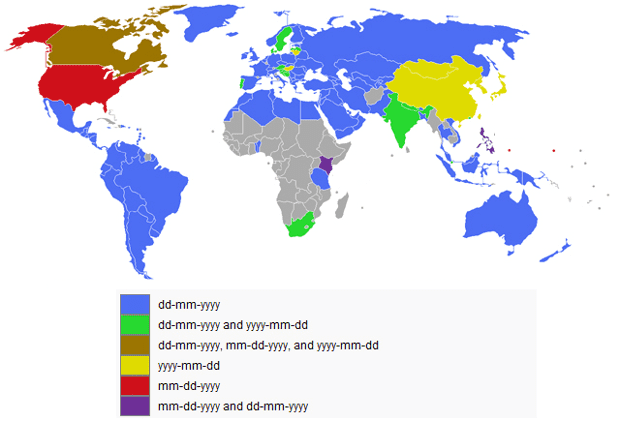
9. Put days before months
The majority of the world puts days in front of months in
their dates:
You have probably come across situations in which you needed
to convert a string into a date in Python. There are a few
ways to do that, but you may have not had the chance to use
the following method.
It’s not that it is so special that you cannot learn, or that
it is so difficult what’s going on. It’s basically a rare
conversion that you have not had the chance to stumble upon
before.
As Python is one of the most popular languages right now, many
developers from other languages may also start using it
whether that is just on a side project, or a simple script
that can help them automate some tasks.
They may have been able to see how to actually find the index
in an array, for example in Java, where you write the name of
the array and also the index in the brackets. This is also
available in Python.
Finding the number of days is usually quite popular and well
documentated. There can also be cases when we need to find a
difference in terms of weeks or even months.
If you want to find the difference in months between 2 dates,
then here is a quick Python script to help you do that.
For example, between October 2018 and November 2021, there
isn’t just a month difference. There is also a difference in
years as well.
Let us assume that we don’t have dates prepared yet, so we
initialize 2 variables with 2 dates.
After that, we find the difference in terms of number of
months in between.
We should keep in mind that we may have dates that are in
different years, and it’s not enough to think that we can just
subtract two dates. Because of that, we need to also find the
difference in years.
Here is the entire script:
You may get the impression that we may have a negative number
in the end, since we are subtracting the number representing a
month from another month.
To illustrate, let us assume that we have the following:
Now, since we are subtracting the number of months from the
first date and 3 < 12, we will indeed get -9. However, we
also have in the end a difference in years that is equal 1,
since 2021 – 2020 = 1.
Hence, we will add 12 to -9, and in the end we get the result
equal to 3:
When we code programs, hardware is often the last thing
we think about. After all, we have
intuitive compilers
to handle system translations for us. They can even check our
errors for free. Plus, if our computers run the programs
perfectly, then there’s no need to think about how they do
it.
However, this couldn’t be further from the
truth. Here’s why software engineers need at least basic
hardware knowledge.
If you use Python in your work, or simply for scripting,
chances are that there will come a point in time when you are
going to need to work with dates.
Since we still live in this universe where time passes, we may
need to find the number of days that have passed between one
point and another one.
We can of course pull up a calendar and manually count the
days, which is slow and boring.